
 ACTIVE INTEGRATION
Emergency Logs + First Arriving
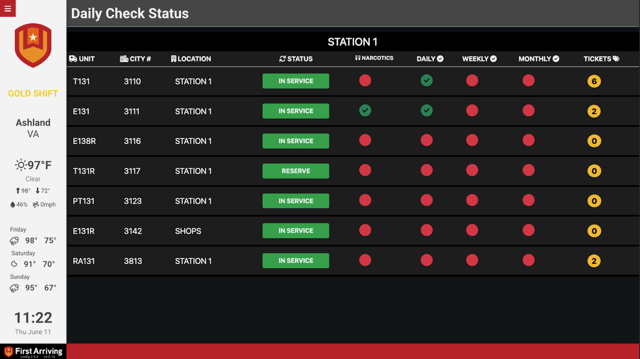
Put your Emergency Logs data on the screens in your stations: apparatus status, daily and weekly check compliance, narcotics log sign-offs, out-of-service units, and open trouble tickets, all live and all without anyone walking over to a computer to look it up.
What Connects
Your Emergency Logs data on the wall and desktop.
Apparatus status at a glance
In service, reserve, and out of service, by station.
Daily checks and sign-offs
Apparatus checks (daily, weekly, monthly) and narcotics log sign-offs, shown complete or outstanding.
Open trouble tickets
Trouble ticket counts, broken out per station or per apparatus.
Boards built around a role
A fleet board for fleet managers, an inventory board for inventory, an EMS board for EMS, each showing only what that role needs.
Live in four steps.
Contact Emergency Logs support
Call +1 657-224-0677 or email support@emergencylogs.com and let them know you want to display an Emergency Logs board on your dashboard.
Tell them what you want to see
Describe the board you want: who it's for and where it hangs.
Review the preview they send you
Emergency Logs builds the board and sends a link so you can review it before it goes live.
Send us the URL
Once it looks right, send us the link and which dashboard and layout position you want it in.
Support Center
Full setup details for Emergency Logs