
 ACTIVE INTEGRATION
FlowMSP + First Arriving
First Arriving puts FlowMSP live alarms on your wall screens and desktop views of your wall dashboards the moment a call is dispatched: nature of call, address, responding units, notes, directions and ETA, a turnout timer, and a flag when a pre-plan exists for the address. Your CAD stays primary.
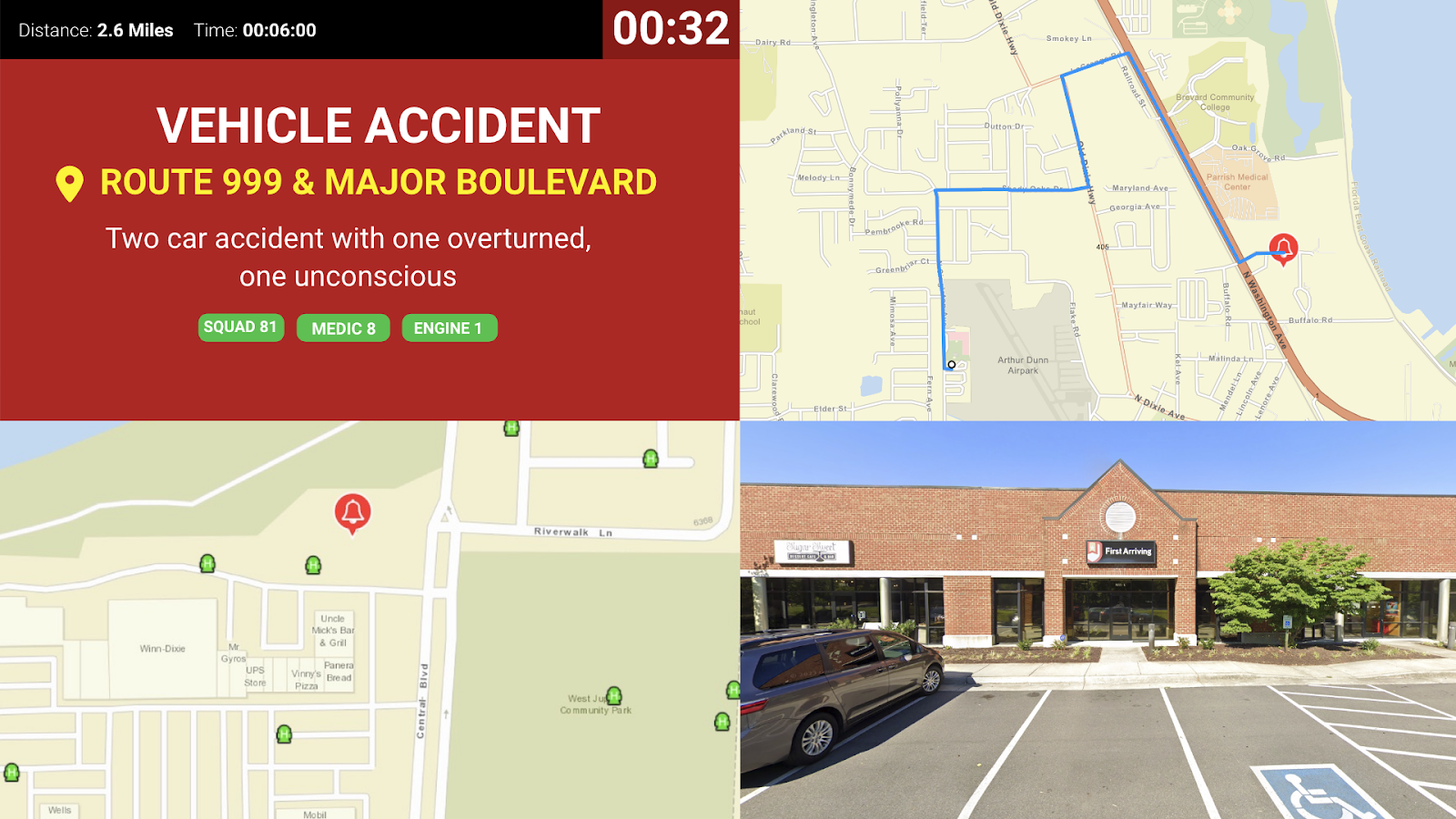
Live Alarm Notifications: Calls display instantly when dispatched
Mapping & Navigation: View directions, ETA, and distance to incident
Pre-Plan Alerts: Automatically indicates if a pre-plan exists for the address
Turnout Timer: Track response times as calls come in
Custom Alert Sounds: Personalize audio alerts (with demo options available)
Enhanced Mapping: Google Street View, ESRI layers, and more
As a reminder, our platform is developed for secondary notification of alarms and situational awareness. You should always rely on your CAD/Dispatch Center for primary dispatch information.
What Connects
Your FlowMSP data on the wall and desktop.
Live alarm notifications
Calls display instantly when dispatched.
Call details
Nature of call, address, responding units, and notes.
Mapping and navigation
Directions, ETA, and distance to incident.
Pre-plan alerts
Automatically indicates if a pre-plan exists for the address.
Turnout timer
Track response times as calls come in.
Custom alert sounds
Personalize audio alerts, with demo options available.
Enhanced mapping
Google Street View, ESRI layers, and more.
Sample Views
See it on the dashboard.
Live in four steps.
We'll provide you with an API key
Send the key to your FlowMSP representative
Data flows automatically
Once enabled, data flows directly to your First Arriving dashboards with no extra setup required.
Additional Note
First Arriving is designed for secondary notification and enhanced situational awareness. Always rely on your CAD/Dispatch Center for primary dispatch communications.
Frequently asked questions
What shows when a call is dispatched?
The call displays instantly: nature of call, address, responding units and notes. Screens add directions, ETA and distance to the incident, a turnout timer, custom alert sounds, and enhanced mapping with Google Street View and ESRI layers.
Will crews know if there's a pre-plan?
Yes. The screen automatically indicates if a pre-plan exists for the address.
What setup is needed, and does it replace our CAD?
We provide you with an API key, you send it to your FlowMSP representative, and once enabled the data flows to your dashboards with no extra setup. It does not replace CAD: First Arriving is designed for secondary notification and situational awareness, so always rely on your CAD/Dispatch Center for primary dispatch.
Support Center
Full setup details for FlowMSP