
 ACTIVE INTEGRATION
Tablet Command + First Arriving
First Arriving puts Tablet Command dispatch information on your wall screens and desktop views of your wall dashboards: live call alerting the moment a run comes in. Between calls, Recent Alarms shows a running list of recent calls with a plotted map, on your wall screens, desktops and mobile.
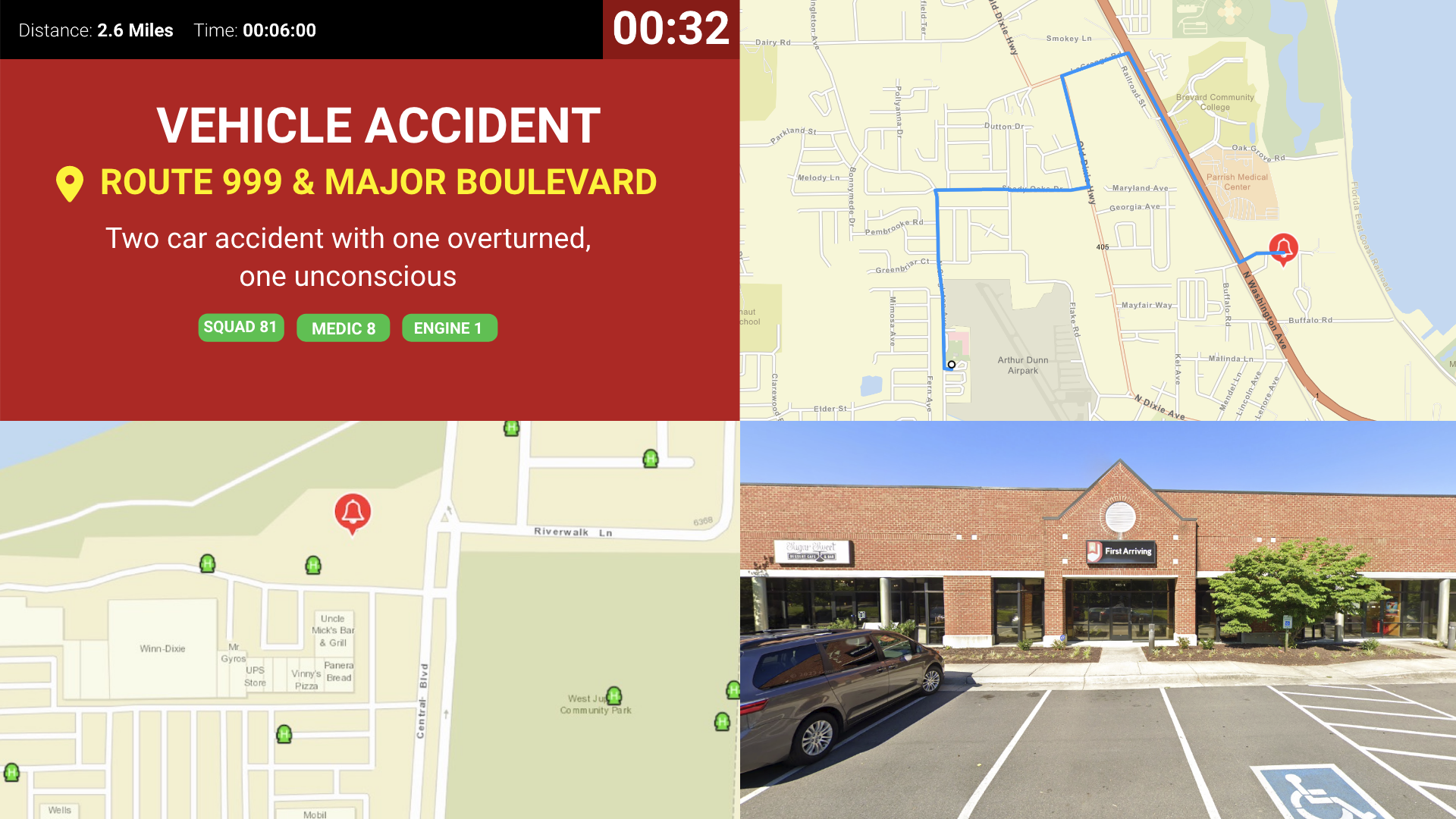
Alerting
Real-time call details the moment a call comes in.
What Connects
Real-time call information
Nature of call, address, units dispatched, and call notes.
Turnout timer
ETA and distance
Custom alert sounds
Listen to examples.
Maps
Path from station to scene, Google Street View, and other mapping features.
ESRI layers
Steps
We generate an API token for you to give to Tablet Command
Email dashboards@firstarriving.com to request your token, then pass it to your Tablet Command contact.
Additional Note
Data or API access could carry an additional charge. This is determined by the vendor, not by First Arriving.
See It In Action
Recent Alarms
A running list of recent calls between dispatches, with a plotted map.
What Connects
Cards or table view
Single or two-column cards, or a table with columns for number, type, priority, address, units, and time.
Color-coding by call type
For example, highlighting fire calls so they stand out from EMS runs.
Color-coded unit badges
So crews can spot their own apparatus at a glance.
Plotted map
Beside or below the list, to suit portrait or landscape screens.
Steps
Already set up for Alerting?
Recent Alarms runs on the same Tablet Command connection, so there’s nothing further to configure.
Tell us your layout and screen
Email dashboards@firstarriving.com with which layout you’d like and which screen it should go on.
See It In Action
Frequently asked questions
What shows when a call comes in?
Nature of call, address, units dispatched and call notes, the moment the call comes in. Screens add a turnout timer, ETA and distance, custom alert sounds, a map of the path from station to scene, Google Street View and ESRI layers.
What do crews see between calls?
Recent Alarms: a running list of recent calls with a plotted map, available on your wall screens, desktops and mobile. Choose single- or two-column cards, or a table with number, type, priority, address, units and time, plus color-coding by call type and color-coded unit badges so crews spot their own apparatus.
What setup is needed?
We generate an API token for you, and you pass it to your Tablet Command contact. Recent Alarms runs on the same connection with nothing further to configure; just tell us which layout you'd like and which screen it goes on. Data or API access could carry an additional vendor charge.
Support Center
Full setup details for Tablet Command